How I Built a Self-Service Microservice Platform — From CI/CD Pipelines to an Internal Developer Portal
A DevOps & Platform Engineering Case Study
Live Demo
Full self-service flow — from Backstage template to a live Kubernetes deployment in under 60 seconds
A developer deploys a production-ready, fully automated microservice to Kubernetes in under 60 seconds, with zero infrastructure knowledge required. No tickets, no waiting, no DevOps bottleneck — just a form, a click, and a live service.
Tech Stack
The Problem: DevOps Engineers as Bottlenecks
Every engineering team has the same story. A developer needs a new microservice. They file a ticket. Then they wait — for someone to create a GitHub repo, write a Dockerfile, set up a CI pipeline, configure Kubernetes manifests, DNS, and deploy it all. By the time the service is live, days have passed and momentum is lost.
The DevOps engineer doing all this work is skilled and capable. The problem is not competence — it is structure. When one person or one team is the gateway for every infrastructure request, they become a bottleneck no matter how fast they work.
I wanted to solve that problem. Not by removing the DevOps layer, but by packaging it into a self-service platform that developers can use independently.
Architecture Overview
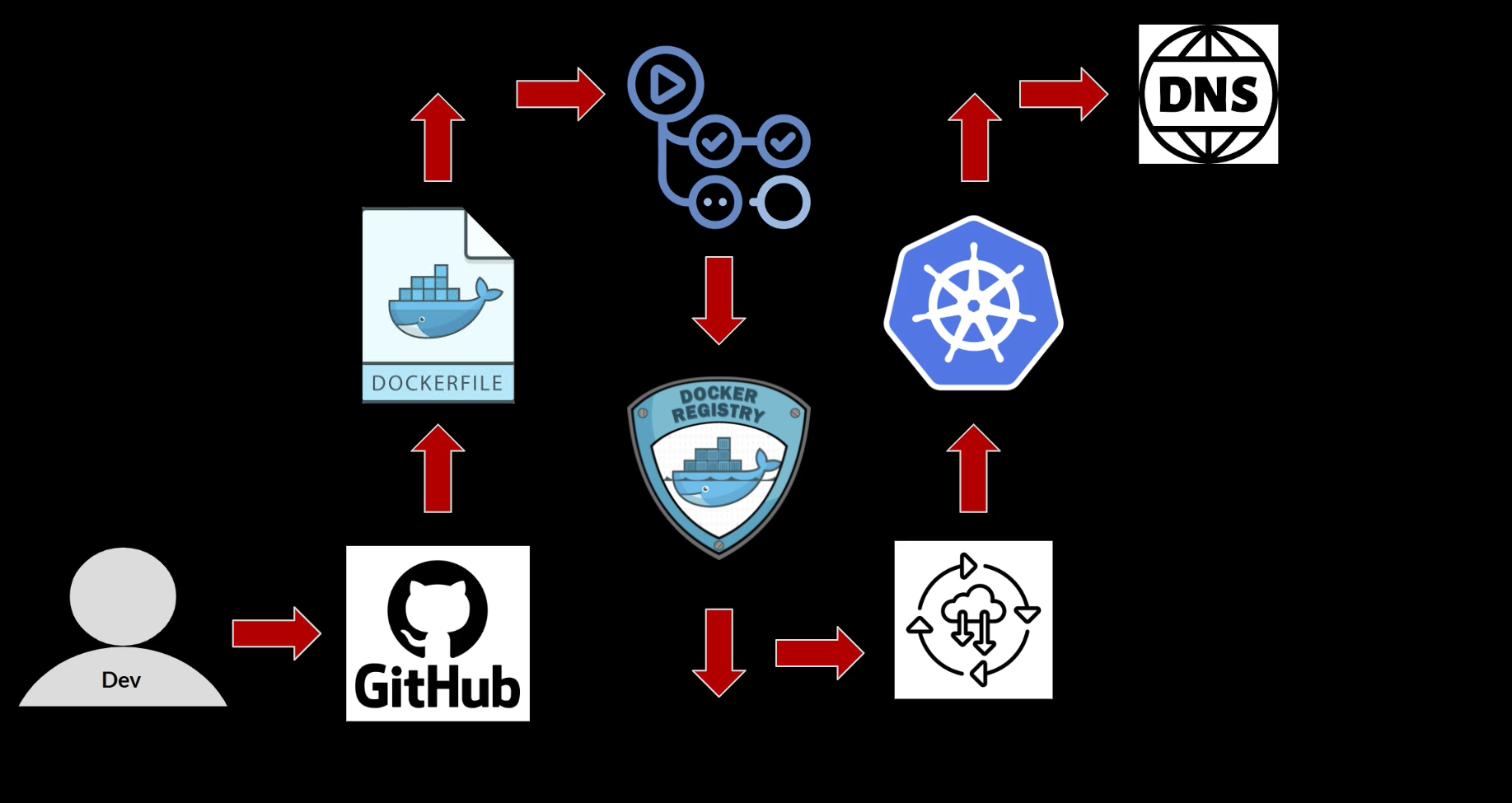
The project has two layers. The first is the DevOps foundation: a complete CI/CD pipeline from a GitHub push to a running Kubernetes pod, fully automated. The second is the platform layer: an Internal Developer Portal built with Backstage that wraps the entire DevOps pipeline into a one-click experience.
How It Was Built
Layer 1 — The DevOps Foundation
Python Flask Application
The workload is a Python Flask API with a health check, time endpoint, and info route. Intentionally simple — the infrastructure around it is the focus.
Containerization
Dockerfile builds a lightweight production image. Images are tagged with the Git commit SHA, giving full traceability between the running container and the exact code it was built from.
CI Pipeline (GitHub Actions)
Triggered on every push to main. Checks out code, builds the Docker image, tags it with the commit SHA, and pushes to Docker Hub. If the build fails, deployment never happens.
CD Pipeline — GitOps Pattern
The CD job doesn't deploy directly to Kubernetes. It clones the Helm chart repo, updates the image tag in values.yaml using yq, and commits back to GitHub. That commit triggers ArgoCD.
ArgoCD Deployment
ArgoCD watches the Helm chart repo. When the CD pipeline commits a new image tag, ArgoCD detects the change and syncs — rolling out the new version automatically. No drift, no hidden state.
Kubernetes on Kind
Deployed on a Kind cluster (Kubernetes in Docker), simulating a production environment. Exposed through an Ingress controller with a custom hostname via local DNS.
Layer 2 — The Internal Developer Platform
Software Catalog
Central directory of all components. Each service is registered via a catalog-info.yaml at the repo root, defining name, type, lifecycle, and ownership. Solves the "who owns what" problem.
TechDocs — Docs as Code
Documentation written in markdown alongside the code. Backstage auto-renders it into a searchable doc site on every push. No stale wikis, no Confluence drift.
Software Templates
The self-service engine. A YAML template that creates a GitHub repo, Dockerfile, CI/CD pipeline, Kubernetes manifests, ArgoCD config, and catalog registration — all from a single form.
GitHub OAuth
Replaced guest auth with GitHub OAuth. A username-match resolver maps GitHub identities to Backstage user entities. Only whitelisted users can access the portal.
PostgreSQL Backend
Backstage's in-memory SQLite replaced with PostgreSQL on Kubernetes via the Bitnami Helm chart. PVCs ensure catalog entries and user data survive pod restarts.
Backstage on Kubernetes
Backstage itself deployed to Kubernetes — compiled production Docker image, Deployment + Service + Ingress. Config injected via environment variables, no image rebuild needed per environment.
The GitOps Pipeline — Step by Step
A push to the main branch triggers the GitHub Actions CI workflow automatically.
Image is built, tagged with the commit SHA (e.g. python-app:ed7159a), and pushed to Docker Hub. Typically completes in under 60 seconds.
The pipeline clones the Helm chart repo, uses yq to update image.tag in values.yaml, then commits and pushes.
ArgoCD polls the Helm chart repo, detects the new commit, and initiates a sync within ~3 minutes.
ArgoCD applies the Helm chart — updates the Deployment, Service, and Ingress. Zero-downtime rolling update.
values.yaml always reflects exactly what is running. No hidden state, no drift, no manual kubectl apply.
The Self-Service Flow — Developer Experience
GitHub OAuth authentication — no separate accounts, no passwords to manage.
Selects the "New Microservice" software template from the Backstage catalog.
App name, description, environment target. No YAML, no kubectl, no infrastructure knowledge needed.
Backstage runs the template: GitHub repo, Dockerfile, CI/CD pipeline, Kubernetes manifests, ArgoCD config, and catalog registration — all automated.
Under 60 seconds from form submission to a running, fully automated Kubernetes deployment.
Key Technical Decisions
| Decision | Why |
|---|---|
| Commit SHA as image tag | Using latest hides which version is deployed. SHA provides an unambiguous link between the running container and source code. Rollbacks are trivial. |
| Separate CI and CD jobs | The CI artifact (Docker image) is immutable once built. The CD job only updates desired state in Git — independent concerns, independent failure modes. |
| GitOps over direct kubectl from CI | Direct deployment creates split-brain state. ArgoCD continuously reconciles, so drift is detected and corrected automatically. |
| Backstage over a custom portal | Building an IDP from scratch is months of work. Backstage provides the plugin architecture, catalog schema, template engine, and auth integrations out of the box. |
| Username-match auth resolver | Simplest to reason about and debug. Maps directly to GitHub identities without extra mapping layers. |
What I Would Improve in Production
Results
Closing Thoughts
Platform engineering is not a replacement for DevOps. It is what happens when DevOps matures to the point where the best thing you can do for your organization is stop being the person who does the work and start being the person who builds the system that does the work.
Every tool in the stack — Docker, GitHub Actions, Kubernetes, Helm, ArgoCD, Backstage — serves a specific purpose in the pipeline, and the whole point is that a developer never needs to interact with any of them directly.