AWS Lift-and-Shift Migration for a Multi-Tier Web Application
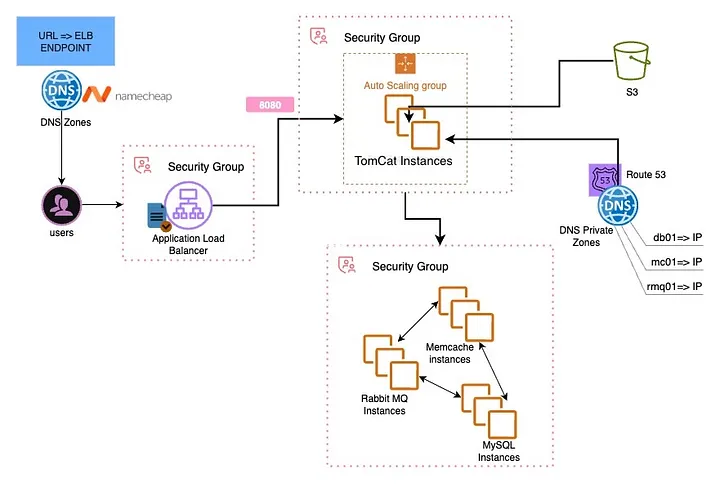
Multi-tier architecture — ALB → Tomcat (ASG) → Backend tier (MariaDB, Memcached, RabbitMQ) with Route 53 private DNS
This project migrated a multi-tier Java web application — VProfile — from an on-premises setup to AWS using a lift-and-shift approach. The goal was to move the stack to the cloud without any application code changes, leveraging AWS primitives to improve scalability, reliability, and operational flexibility.
Tools & Services Used
Project Goal
The on-premises VProfile stack — Spring MVC on Tomcat, MariaDB, Memcached, and RabbitMQ — worked fine locally, but every deployment felt like surgery. Scaling meant buying hardware. The objective was to lift-and-shift the entire stack to AWS with:
- Pay-as-you-go compute with Auto Scaling
- Managed TLS via ACM
- Traffic routing through Application Load Balancer
- Private DNS resolution via Route 53
- Artifact staging via S3
- No application code changes
Architecture Overview
The stack was split into two tiers separated by security groups:
- App tier: Tomcat instances behind an ALB, managed by an Auto Scaling Group. WAR deployed as ROOT.war (serves at /).
- Backend tier: Three separate EC2 instances inside a single Backend Security Group — MariaDB (3306), Memcached (11211), RabbitMQ (5672/15672).
- Networking: ALB → Target Group → ASG; Route 53 public zone for the app; Route 53 private zone for backend name resolution; ACM certificate for HTTPS.
Flow of Execution
Created key pairs and defined SG boundaries first — ALB-SG, App-SG, and Backend-SG — before launching any instance.
Four EC2 instances launched with bash user-data scripts to provision Tomcat, MariaDB, Memcached, and RabbitMQ on startup.
Created public hosted zone for the app domain and private hosted zone mapping db.vprofile.in, cache.vprofile.in, mq.vprofile.in to backend private IPs.
Built the application with Maven, then staged the WAR to S3. Tomcat pulled ROOT.war directly from S3 at deploy time.
Created Target Group on Tomcat port, configured ALB listeners (80 → redirect to 443, 443 with ACM certificate for TLS termination).
Updated Namecheap nameservers to Route 53. Created A/ALIAS record pointing app domain to the ALB.
Validated ALB health checks, confirmed HTTPS with valid TLS, tested app CRUD operations, and verified Memcached and RabbitMQ connectivity.
Baked an AMI from the verified Tomcat instance. Created Launch Template → Target Group → ALB → ASG (min 2, desired 2, max 4) with target-tracking scaling.
Security Groups — Contracts First
SGs were defined before any instance was launched. This eliminated most "connection refused" issues.
- ALB-SG: Inbound 0.0.0.0/0 on 80/443. Outbound to App-SG only.
- App-SG: Inbound from ALB-SG on 8080. Outbound to Backend-SG on 3306, 11211, 5672/15672.
- Backend-SG: Inbound only from App-SG on required ports. No public exposure.
The Sneaky DNS Bug I Hit
The UI loaded fine behind the ALB but the app couldn't reach the database. SGs and OS firewalls were clean. The root cause: I had edited application.properties to use the new .vprofile.in FQDNs but forgot to save before the Maven build. The deployed WAR pointed at the wrong endpoints.
Temporary /etc/hosts entries on the Tomcat node confirmed the fix immediately. The real fix was saving the config change, rebuilding with Maven, re-staging to S3, and redeploying.
What I Learned
What I Would Improve Next
- Replace manual EC2 provisioning with Terraform or CloudFormation
- Move application.properties secrets to AWS Secrets Manager or Parameter Store
- Use RDS instead of self-managed MariaDB on EC2
- Use ElastiCache instead of self-managed Memcached
- Add CloudWatch alarms and a dashboard for the backend tier
- Automate artifact deployment with a lightweight CI pipeline